
6 QR Codes for Retail Displays Mistakes Most Businesses Make
QR codes on retail displays can work extremely well, but only when the display, the destination, and the customer moment line up properly. Too many businesses add a code to a shelf display, window graphic, counter card, or point-of-sale panel without thinking through what the shopper is meant to do next or how that scan will be measured.
The result is usually familiar: weak scan volume, poor customer response, vague reporting, and printed displays that become outdated faster than expected. For retailers across London, Greater London, and the wider UK, the real opportunity is not just adding a code. It is avoiding the mistakes that make retail display QR strategy harder to manage after print.
💡 Short answer
The most common QR codes for retail displays mistakes are poor placement, weak calls to action, wrong destination choices, lack of editability, poor tracking structure, and trying to make one code do everything. The best retail display QR strategy keeps the shopper journey simple, matches the display to a useful next step, and makes the printed asset measurable after launch.
Quick facts: QR codes for retail displays
- Best display role: connect physical retail displays to a clear digital next step such as product details, offers, support, signup, or direct response.
- Most common failure: the code exists, but the shopper is not given a compelling reason to scan it.
- Commercial upside: better customer engagement, stronger post-print control, and clearer scan tracking by display, branch, or campaign.
- Operational advantage: editable destinations reduce the need to replace working displays just because the linked message changed.
- Retail takeaway: a QR code should support the display’s purpose, not distract from it.
Complete guide: 6 QR codes for retail displays mistakes most businesses make
1) Putting a QR code on the display without giving shoppers a reason to scan
This is the most common mistake by far. A retail display gets a QR code because it looks current, but the shopper has no idea what the scan is for. If the display does not explain the benefit, the code becomes background decoration rather than a useful call to action.
Retail display scans work better when the message is specific. “Scan for live stock”, “Scan for colours and sizes”, “Scan for setup help”, or “Scan to ask the team” is stronger than a bare code with no instruction. Shopify’s current guidance on retail QR use also reflects this practical point: QR codes on windows, events, and limited-inventory retail setups work best when they create a clear next step for the shopper.
Where the goal is a direct question rather than extended browsing, a QR code for email enquiries can be a better fit for showroom displays, service counters, and product demonstration areas.
2) Sending every retail display scan to the homepage
A homepage is rarely the best destination for a display scan. Shoppers scanning an in-store display are usually acting in a very specific moment. They want product information, an offer, a size guide, a direct contact route, a care guide, a booking page, or a fast-response action. Sending them to a broad homepage usually creates friction and weakens the value of the display.
The destination should match the display context. A premium product display may need detailed specifications. A promo endcap may need a short campaign page. A service-led display may need a response route. A window display may need a browse-now action for after-hours traffic, which Shopify specifically highlights as a useful retail QR use case.
If speed matters more than browsing depth, a QR code for SMS response can reduce friction for appointment requests, store support, callback requests, or short customer interactions.
3) Using one QR code across every display and then expecting useful tracking
Businesses often want simplicity, so they reuse the same QR code across multiple displays, windows, counters, branches, or campaign units. That makes roll-out easier in the short term, but it weakens reporting later. If every display uses the same code, it becomes much harder to tell which unit, branch, or message actually drove the scan.
Retail displays should be measurable at the level that matters commercially. That could be by branch, by display type, by campaign, by seasonal promotion, or by fixture location. The more clearly you separate those instances, the easier it is to learn which displays deserve more space, more print budget, or a different message.
For a broader print-and-signage view of this thinking, see 7 QR codes for signage strategies that improve scan tracking.
4) Treating a long-life retail display like a short-life campaign asset
Retail displays often outlast the linked message behind them. Product ranges change. Offers expire. Store information moves. Landing pages get replaced. If the QR destination is fixed, the display becomes weaker over time even if the printed asset still looks perfectly usable.
This is why editable QR destinations matter so much in retail display environments. You should be able to keep the physical display in place while updating the digital action behind it. That is especially useful on shelf displays, counter units, window graphics, freestanding point-of-sale materials, and promotional fixtures that may stay visible long after a specific campaign message changes.
Shopify’s current retail QR guidance reflects the same wider direction: retailers are using QR codes to connect physical displays with richer product information, promotions, and mobile-led customer actions without relying on static display journeys alone.
5) Ignoring the physical realities of the display environment
A QR code can be technically correct and still fail in-store. The display may be too low, too high, too reflective, too crowded, too small, or placed in a rushed movement zone where the shopper will not stop. A display mock-up that looks fine on a screen can fail once it reaches a shop floor.
Retail display QR performance is heavily shaped by the physical moment. Can the shopper notice the code quickly? Can they understand why to scan? Is the display message clean enough? Does the landing page load fast enough on store signal? Is there enough contrast and spacing around the code?
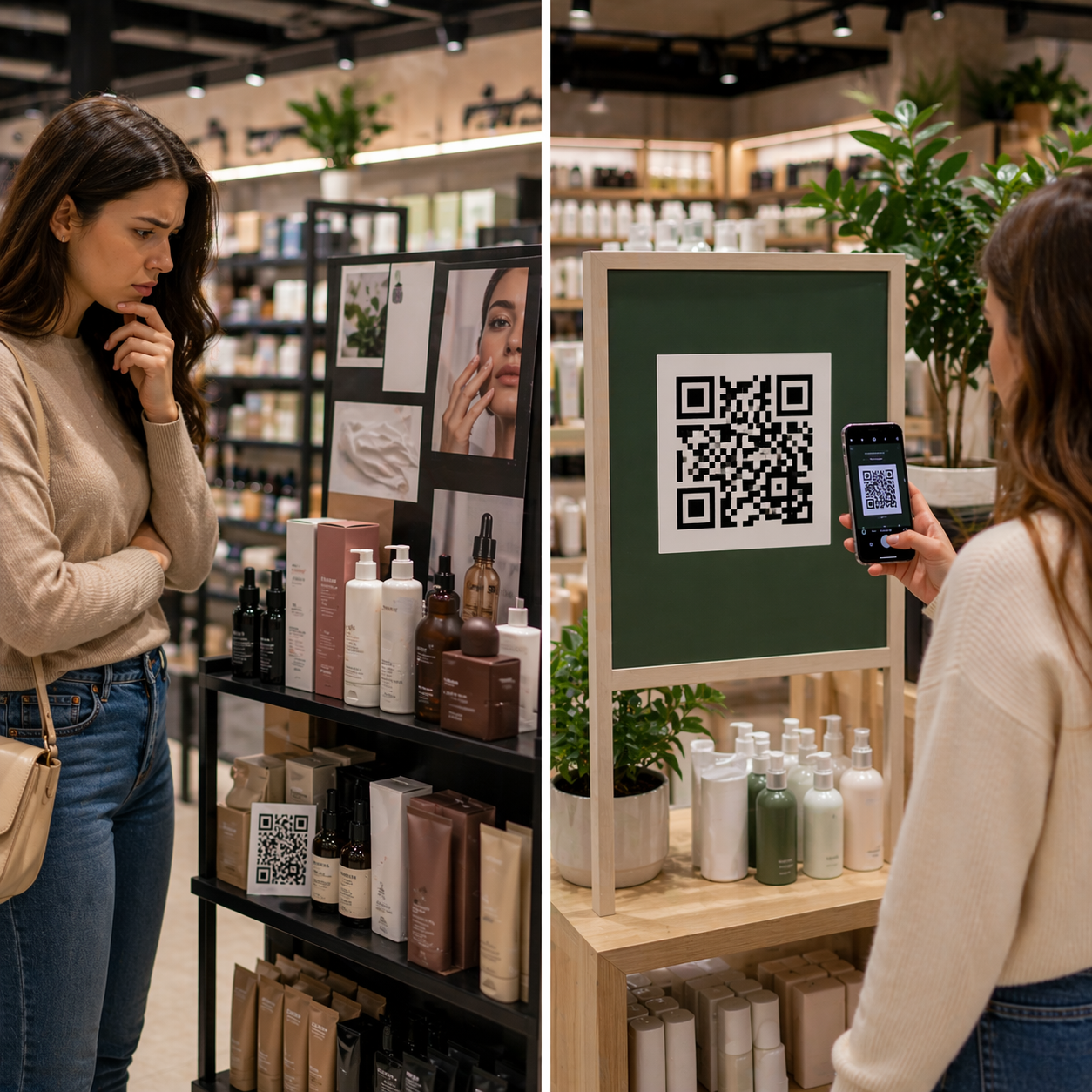
This is also why your chosen image angle is strong. A cluttered-vs-clean comparison makes the point visually: cleaner retail displays usually make the QR invitation easier to notice and easier to act on.
6) Trying to make the QR code do too many jobs at once
Retail teams sometimes expect one display code to handle product education, loyalty signup, support, stock lookup, offer redemption, email capture, and checkout all at once. In practice, that usually leads to a muddled shopper journey. The display loses focus, and the scan becomes harder to interpret.
A better approach is to define the primary job of that specific display. Is it there to educate? Convert? Support? Capture a lead? Trigger a faster response? Move after-hours traffic online? Once that role is clear, the QR code can be designed around one strong next step.
That same principle applies beyond retail displays too. For example, QR code asset management stickers make sense when the main goal is item tracking and faster operational access, but retail displays need a different strategy because they are customer-facing rather than asset-facing.
Why these mistakes matter commercially
Retail displays cost money to design, print, install, and maintain. When a display QR strategy is weak, the loss is not only digital. It reduces the value of the printed asset itself. A better-managed display can keep working longer, give you clearer signal on shopper intent, and help physical merchandising connect to digital action more cleanly.
Shopify’s retail signage guidance and its current QR-in-retail coverage both point in the same direction: retail displays increasingly need to bridge physical presence and digital response, especially in environments where shoppers want to continue browsing on mobile, buy later, or access richer product detail on demand.
Examples section: what better retail display QR strategy looks like
Example A — window display: the QR code is linked to featured products for after-hours browsing, with a clear “scan to shop this window” instruction rather than a generic website route.
Example B — shelf display: the code opens comparison information, stock-related detail, or setup guidance for higher-consideration products where the shopper wants extra confidence before buying.
Example C — counter display: the code prompts a direct enquiry or support action instead of forcing the shopper through a full website journey.
Example D — temporary promotion display: each branch uses a separate QR instance so the team can compare which locations and layouts created the strongest scan response.
Example E — premium product fixture: the display remains in place, but the destination changes over time as ranges, offers, or educational content are updated.
YouTube video example (one)
This video is a reasonable fit for the topic because it shows how a QR-enabled retail display can combine display messaging and dynamic QR functionality in a shopper-facing environment:
Quote: Mark Hickman, Co-founder
“A retail display QR code should not be there because the design needs a QR code. It should be there because the display has a clear next action, and the business wants to measure what happens after print.”
— Mark Hickman, Co-founder, Xcan It
External and internal reading worth embedding
Useful external reading includes Shopify’s Shopcodes guidance, which is especially relevant for window displays and limited-inventory retail moments, plus Shopify’s current guide to QR codes in retail and Shopify’s retail signage guide for broader display and merchandising context. For a wider view of how display experiences are evolving in-store, Shopify’s digital signage in retail guide is also a useful supporting read.
Internally, the strongest supporting reads are 7 QR codes for signage strategies that improve scan tracking, how to use a QR code for email to drive more customer enquiries, and how to use a QR code for SMS to drive faster customer response.
Practical checklist before rollout
- give each display one primary job: educate, convert, support, or trigger response
- tell shoppers why to scan: do not rely on the code alone
- avoid homepage destinations: use the most relevant next step instead
- separate tracking by branch or display type: do not flatten all data into one code
- keep destinations editable: long-life displays should not depend on short-life pages
- test the physical placement: visibility, glare, distance, and shopper flow all matter
- review scan data against the display objective: do not measure activity without context
Conclusion: retail displays perform better when the QR job is clear
Most QR code mistakes on retail displays come back to the same issue: the display is trying to do too much, or the shopper is not being given a clear enough reason to scan. Once that happens, tracking becomes vague and the printed display loses value faster than it should.
The better approach is simple. Give each display a defined role, match the QR destination to that role, make the destination editable, and track performance in a way that helps you improve future displays. That is how a printed retail display becomes easier to manage after launch rather than harder.
For UK retailers, the real win is not just getting more scans. It is making every display more measurable, more useful, and more commercially accountable after print.
FAQs
What is the biggest mistake with QR codes for retail displays?−
The biggest mistake is using a QR code without a clear reason to scan. If the shopper does not understand the benefit, the display usually underperforms.
Should retail display QR codes link to a homepage?+
Usually no. It is better to send the shopper to the most relevant next action, such as a product page, offer, support route, enquiry method, or campaign landing page.
Why do retail display QR destinations need to be editable?+
Because displays often stay visible longer than the linked campaign or page. Editable destinations let you keep the display live while updating the message behind it.
How can scan tracking be improved on retail displays?+
Use separate QR instances by display, branch, or campaign, keep the call to action specific, and make sure the destination matches the shopper’s immediate context.
Do QR codes work better on some retail displays than others?+
Yes. They tend to work better where the display naturally leads to a digital next step, such as product education, after-hours browsing, enquiry, support, or short promotional action.
Talk to an Xcan It Specialist
Need QR codes for retail displays that are easier to manage after print and stronger at turning physical displays into measurable customer actions? We’ll help you build retail display workflows that support better scan tracking, clearer response paths, and smarter in-store QR strategy across London, Greater London, and UK-wide operations.